
Next Steps for Implementing an Effective User Access Review (UAR) Program
. Develop a Formal UAR Policy & Governance Framework
Why? Clear policies ensure consistent enforcement and accountability.
How? Draft a User Access Review (UAR) policy that outlines: Review frequency (e.g., quarterly for privileged users, annually for standard users). Roles & responsibilities (e.g., IT manages technical access, business units review functional access). Remediation process (e.g., revoke access within 5 business days if unauthorized). Align policies with industry frameworks (e.g., NIST, ISO 27001, CIS Controls). Establish a governance committee to oversee UAR compliance.
2. Implement an Automated UAR Workflow
Why? Reduces manual effort and speeds up the review process.
How? Deploy workflow automation tools (e.g., ServiceNow, SailPoint, Okta, Microsoft Entra ID). Integrate UAR workflows with IAM systems to automatically trigger reviews. Set up automated reminders and escalations for incomplete reviews. Enable bulk approvals for low-risk users while flagging anomalies for detailed review.
3. Optimize Reviewer Experience with AI & Smart Recommendations
Why? Business managers often struggle to interpret technical access details.
How? Implement AI-driven risk scoring to highlight risky access for focused review. Use natural language descriptions instead of technical permission names. Provide pre-approved recommendations (e.g., "This access hasn’t been used in 6 months—revoke?"). Enable one-click approvals/revocations via email or dashboard.
4. Enforce Just-in-Time (JIT) & Temporary Access
Why? Reduces persistent privileges, lowering the risk of insider threats.
How? Implement JIT access where users request elevated privileges only when needed. Set expiration dates for temporary or contractor access. Use privileged access management (PAM) tools (e.g., CyberArk, BeyondTrust) to grant time-limited admin access.
5. Strengthen Deprovisioning & Lifecycle Management
Why? Prevents former employees from retaining access.
How? Automate offboarding by integrating IAM with HR systems (e.g., Workday, SAP, Oracle). Implement real-time deprovisioning for terminated users. Conduct access reconciliation audits to identify dormant accounts. Set up alerts for orphaned accounts (accounts without an assigned owner).
6. Enhance Visibility with Centralized Access Dashboards
Why? A single source of truth helps ensure proper oversight.
How? Deploy identity governance dashboards to monitor access across all apps. Provide real-time access heatmaps to highlight excessive privileges. Enable drill-down reports for auditors and compliance teams.
7. Ensure Continuous Monitoring & Audit Readiness
Why? Compliance teams need ongoing assurance, not just periodic reviews.
How? Integrate UARs with SIEM tools (e.g., Splunk, QRadar, Microsoft Sentinel) to detect suspicious access. Automate audit logging to capture all access changes. Schedule continuous compliance checks instead of relying on annual audits.
8. Improve Security Culture & Training
Why? Many employees see UARs as a checkbox exercise rather than a security necessity.
How? Conduct role-specific training (e.g., IT admins vs. business managers). Use phishing-style simulations to test whether employees properly review access. Create "UAR Champions" within departments to promote best practices.
Summary: How to Implement a Scalable UAR Program
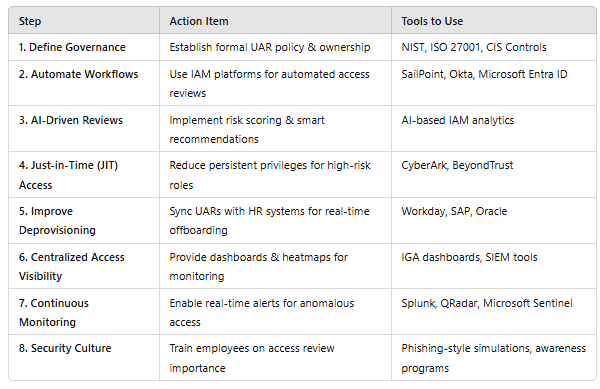
Final Thoughts:
An effective User Access Review program should balance security, automation, and user experience. By integrating IAM tools, AI-driven risk scoring, and governance frameworks, organizations can reduce risk, improve compliance, and streamline access management.
