
Microsoft Entra ID (formerly Azure AD) – A Comprehensive Guide
Following up on my recent articles about the challenges of access management challenges. Here, I focus on a particular, popular solution from Microsoft. I hope you find it useful.
Microsoft Entra ID is an enterprise-grade Identity and Access Management (IAM) solution designed to secure and manage user access across on-premises, hybrid, and cloud environments. It offers authentication, authorization, identity governance, and security capabilities to support Zero Trust and compliance-driven environments.
1. Key Features of Microsoft Entra ID
Microsoft Entra ID provides a comprehensive set of IAM functionalities. Below are its core capabilities:
A. Identity & Access Management (IAM)
✅ Single Sign-On (SSO) → Unified login across Microsoft 365, SaaS, and on-prem apps. ✅ Multi-Factor Authentication (MFA) → Adds extra security layers using biometrics, OTP, or app-based authentication.
✅ Passwordless Authentication → Supports Windows Hello, FIDO2, and Microsoft Authenticator App.
✅ Conditional Access Policies → Enforce risk-based access controls (e.g., restrict access based on location, device, or risk level).
✅ B2B & B2C Identity Management → Secure guest user access for partners and customers.
B. Identity Governance & Administration (IGA)
✅ User Lifecycle Management → Automates onboarding, role assignment, and deprovisioning via HR system integration.
✅ Access Reviews & Certifications → Automates periodic user access reviews for compliance (SOX, HIPAA, PCI-DSS).
✅ Entitlement Management → Manages permissions and enforces least privilege access for business roles.
✅ Privileged Identity Management (PIM) → Just-in-Time (JIT) access for high-privilege accounts (e.g., IT admins, security teams).
C. Security & Compliance
✅ Identity Protection → AI-powered risk analysis detects compromised credentials and insider threats.
✅ Privileged Access Management (PAM) → Reduces standing admin privileges via Just-in-Time (JIT) access.
✅ Microsoft Defender for Identity Integration → Detects identity-based attacks like credential stuffing and phishing.
✅ SIEM Integration → Works with Microsoft Sentinel, Splunk, and QRadar for real-time security monitoring.
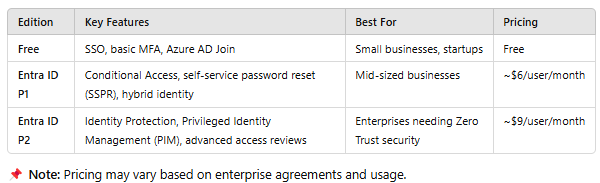
2. Microsoft Entra ID Tiers & Pricing
Microsoft Entra ID is available in multiple pricing tiers to cater to different business needs.
3. Key Benefits of Microsoft Entra ID
🔹 Security-First Approach
Implements Zero Trust with continuous authentication & Just-in-Time (JIT) access.
AI-powered Identity Protection detects & mitigates account takeover attempts.
Conditional Access blocks risky logins from untrusted locations or devices.
🔹 Streamlined User Experience
SSO + Passwordless Authentication → Reduces password fatigue.
Adaptive MFA → Requires step-up authentication only when necessary.
Self-Service Access Management → Users can request, approve, and reset credentials without IT intervention.
🔹 Compliance & Audit Readiness
Automates User Access Reviews (UARs) and role certifications for regulatory compliance.
Logs all access activity, supporting audits for SOX, HIPAA, ISO 27001, PCI-DSS.
Provides built-in identity analytics for forensic investigations.
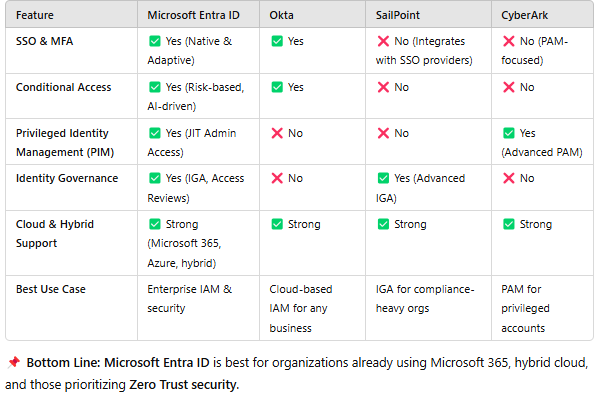
4. Microsoft Entra ID vs. Other IAM Solutions
How does Entra ID compare with other leading IAM platforms?
5. Implementation Roadmap: How to Deploy Microsoft Entra ID
Phase 1: Planning & Assessment
✔ Define IAM requirements – Identify user types, access policies, and compliance needs. ✔ Assess existing IAM stack – Identify integration points with HR, ITSM, and SIEM systems. ✔ Plan Conditional Access Policies – Define rules based on location, risk level, and device trust.
Phase 2: Deployment & Configuration
✔ Enable SSO & MFA – Configure authentication methods for seamless logins. ✔ Set Up Identity Governance – Define role-based access controls (RBAC) & access review workflows. ✔ Implement Privileged Identity Management (PIM) – Secure high-risk accounts with Just-in-Time (JIT) access.
Phase 3: Monitoring & Optimization
✔ Enable Identity Protection – Activate AI-driven risk analysis for detecting identity threats. ✔ Automate User Access Reviews – Schedule periodic certifications to review access entitlements. ✔ Integrate with SIEM & Compliance Tools – Connect with Microsoft Sentinel, Splunk, QRadar for real-time security alerts.
6. Best Practices for Maximizing Microsoft Entra ID
✅ Adopt a Zero Trust Approach
Use Conditional Access to verify every login attempt based on risk factors.
Implement Least Privilege Access (LPA) and Just-in-Time (JIT) privileges for admins.
✅ Enable Adaptive MFA
Require MFA for high-risk logins only (e.g., logging in from untrusted networks).
Use passwordless authentication (FIDO2, Windows Hello, Microsoft Authenticator) to enhance security.
✅ Automate Access Reviews
Implement AI-powered Access Certification to automatically review excessive permissions.
Set up auto-remediation workflows to revoke unused access.
✅ Integrate with HR & IT Systems
Automate user provisioning and deprovisioning by syncing with Workday, SAP, Oracle.
Enable real-time access enforcement for terminated employees.
Final Thoughts: Why Choose Microsoft Entra ID?
✔ Enterprise-Grade Security – AI-driven threat detection, Zero Trust model, and Privileged Identity Management (PIM).
✔ Seamless Microsoft Integration – Works natively with Microsoft 365, Azure, Windows 11, Teams.
✔ Cost-Effective IAM Solution – Competitive pricing vs. Okta, SailPoint, and CyberArk.
✔ Scalability for Hybrid & Multi-Cloud – Supports on-prem, cloud, and hybrid deployments.
